Posts

DYNAMICS 365 PORTAL HOW TO CALL AND EXECUTE WORKFLOW

Image
Calling Dynamics 365 Workflows from portals can only be done by configuring and adding buttons in entity lists or entity forms. However, and for some requirements, you need to call a workflow from a web page that does not contain entity list nor entity form. So, how do we do this? All portal pages automatically include a JS reference to the file js\antiforgerytoken.js that contains an object named shell which has a method called ajaxSafePost that can be used and let you achieve request calls to the server. How do we use this function to call workflow from the portal? Below is an example of how you could use the ajaxSafePost method to invoke the execute workflow service. I've created the below function that take the parameters needed to execute the workflow function Execut...
DYNAMICS 365 AUTOMATICALLY EXPAND COLLAPSE BUSINESS PROCESS FLOW IN JAVASCRIPT

Image
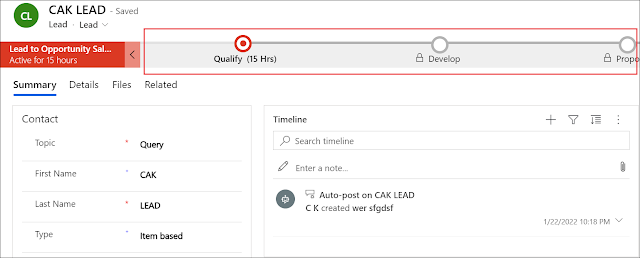
As you know, in Dynamics 365, business process flows are used to ensure that the users follow the same steps in order to achieve specific operation. It leads the users through the process by guiding them on what should be entered during each phase of it. In the Unified Interface, the business process flow is by default collapsed and the user must click on it to see what is needed in this phase. However, you can still enhance this user experience, by dynamically showing and hiding the business process flow whenever it is needed. Therefore, the user can know when and what is needed in this phase of the process. In the following points, we will see how to dynamically collapse and expand a business process flow (BPF) in JavaScript . First thing to know is that the BPF can have three display states: Expanded, Collapsed, and Floating ...

POWER PLATFORM RECOVER DELETED ENVIRONMENTS

Image
You deleted an environment and you want to recover it back? You can do it from the Power Platform admin center if you are still within the time limit which is 7 days of deletion. In the below steps, we will see how to recover a deleted environment from the admin center . Open the Power Platform admin center and go to Environments Click the Recover deleted environments button In the new page, you will see all the environments that were deleted within 7 days of deletion Select an environment to recover, and click Recover Confirm the recovery by clicking Continue and then OK ...

DYNAMICS 365 HOW TO EXECUTE FETCHXML QUERIES IN C#

Previously, we saw how to execute FetchXml query using Xrm.WebApi in JavaScript In this quick post, we will see how to execute FetchXml query in C# . Prepare the FetchXml you want to execute whether from the Advanced Find, or any other FetchXml generator in the community Create the C# function you want to call in order to execute the retrieve request and Copy/Paste the FetchXml query In order to be able to execute FetchXml queries in C#, you must use the FetchExpression class instead of QueryExpression as per the below public void FetchXmlInFetchExpression() { var fetchQuery = @" <fetch version='1.0' output-format='xml-platform' ma...

DYNAMICS 365 HOW TO EXECUTE FETCHXML QUERIES IN WEB.API JAVASCRIPT

In Dynamics 365, you can use WebAPI calls to retrieve data using OData queries. However, when coming to more complex queries, the OData might become complicated to be built if not impossible. Therefore, using FetchXml queries in the WebAPI call is your best option. Querying using FetchXml have more advantages from the easiness to be generated using the Advanced Find and more readable, to using joins and aggregations. In this quick post, we will see how to execute FetchXml query using Xrm.WebApi in JavaScript . Prepare the FetchXml you want to execute whether from the Advanced Find, or any other FetchXml generator in the community Prepare the JavaScript function you want to call in order to execute WebAPI request The below function is used to retrieve the user roles ...

DYNAMICS 365 HOW TO RETRIEVE BUSINESS UNIT DEFAULT TEAM IN C# AND JAVASCRIPT

In Dynamics 365, each Business Unit can have one or more Teams under it, but has one Default Team that will be automatically created by the system each time a new Business Unit is created, and will have the same name as the Business Unit name. The membership of this team will be systematically managed, where users are automatically added to the team whenever users are added to the business unit and removed from the team whenever users are removed from the business unit. In addition, the default team can be used to simplify the management of the security roles when users have common permissions, where you can associate a security role to the Default Team with a set of permissions that will be given to all users in the business unit. On the other hand, Default Teams cannot be deleted and will have the field Team Type set to Owner ; therefore, they can own records if needed by setting it ...

DYNAMICS 365 ADVANCED FILTER

Image
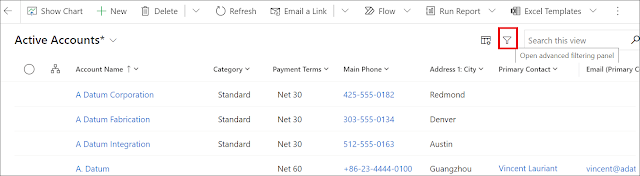
Previously, we saw the Column options feature that came with the 2021 Microsoft Wave 2 Release that allows the users to add columns to the views on the fly. In this post, we will see an older feature that came with the 2020 Microsoft Wave 1 Release which is the Advanced Filter . As you know, one of the most used functionality in Dynamics 365 is the Advanced Find that gives users the ability to build and execute complex queries and apply actions on the retrieved records. In addition, the filter that existed on the views, was limited to the columns displayed on the view and sometimes not all the columns can be filtered. However, with the introduction of the Advanced Filter feature, the end-users are able to build complex filtering in the entity views whether for system or custom entities similarly to the Advanced Find. But, they will stay in the same ...

DYNAMICS 365 COLUMN OPTIONS FEATURE TO ADD VIEW COLUMNS ON THE FLY

Image
Each time, when end-users request the ability to modify the views, we mainly direct them to the Advanced Find or to Create a personal View where they can add or remove columns as per their need. However, with the 2021 Microsoft Wave 2 release, the users will be able to easily change the view in the interface by adding/removing columns on the fly in the opened view using the Column options feature. So, Let's see how this feature works in the below steps Go to your Dynamics 365 environment and open a view (I will work in the Active Account view) Click the Column Options button on top of the view The Edit Columns pane will open in the right side of the view Here, you can remove columns, organize th...

DYNAMICS 365 HOW TO HIDE RECENT RECORDS FOR LOOKUP FIELD IN UCI

Image
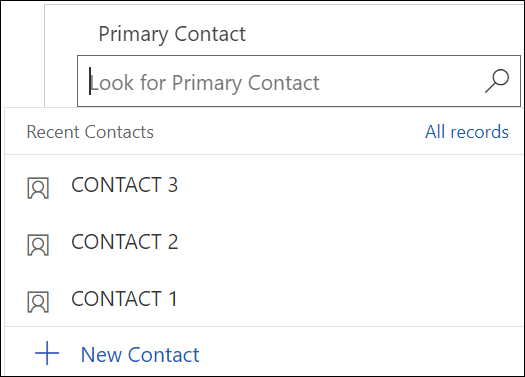
In UCI, a lot of behaviors have been changed comparing to the Classic Web Interface such as the tabs, BPF, and many others. Today, I will be talking about one of these behaviors which is the Recent Records in lookup fields. In a brief summary, the Recent Records feature will suggest the latest records that have been searched for, where the user can select one of them, and, the list of available records of the current view will then be displayed. This is a nice-to-have feature since it might help the users to speed up data entry. However, if the lookup has been filtered to display specific records, the Recent Records will not respect this filter and will keep showing records even is they should not. This scenario can lead to selecting a record by the user that is not allowed to be selected. Therefore, in this situation, it is better to hide the Recent Records t...

HOW TO CONNECT TO DYNAMICS 365 ENVIRONMENT USING POSTMAN TO DO WEBAPI CALLS

Image
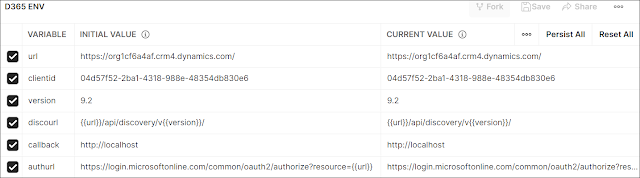
As a developer, you normally use Console Application, JavaScript, or plugins in XrmtoolBox in order to test specific requests to make sure they are working as expected. However, and since the introduction of the Web API in Dynamics 365, there are some tools that you can use to consume the needed WEB API requests against Dynamics 365 environment. My preferred tool to use is Postman, and this is our topic today where we will learn how to connect Postman to Dynamics 365 environment and consume the desired operations like create, update... in order to quickly test and accomplish them. First, you have to create an App Registration in Azure and enable its options as explained in this post to be able to connect to Dynamics 365 environment through Postman using the OAUTH authentication Open Postman, a...