Posts

Showing posts with the label web resource

DYNAMICS 365 HOW TO FIX SECTION OVERLAPPING OTHER SECTION IN FORM

PROBLEM Last day, I was working with D365 V9 on-premise and I have encountered a weird issue where a section was overlapping on another section side by side. It was very strange since all the fields in this section are having the same behavior. The special thing about this section is, that it contains many html web resources and other fields that are being hidden using JavaScript, and the issue occurs in the edit form. When the web resources are displayed on the create form, the issue is not there and everything seems normal. REASON After some digging in the html to see what might be the issue, I noticed that the section (table in the generated html) with the erroneous behavior has a style table-layout : auto, if I set it to fixed (in the developer tool - F12), the section is normally displayed and the overlapping is gone even when I resize the window. However, this soluti...

DYNAMICS 365 HOW TO USE FORM CONTEXT IN HTML WEB RESOURCE

Everyone knows that Xrm.Page is deprecated and it is replaced by the executionContext.getFormContext() method, where the execution context is passed from the form as the first parameter to the function you are calling (reference link ). In the same above link, it is mentioned that Although Xrm.Page is deprecated, parent.Xrm.Page will continue to work in case of HTML web resources embedded in forms as this is the only way to access the form context from the HTML web resource . However, you can access the form context from HTML web resource without using Parent.Xrm.Page and this is the topic for today. You have to create a function that will return the formContext , then, on load of the form call this function, and finally call this function from the web resource. Declaration of a variable and function that return the formCont...

DYNAMICS 365 CREATE, MANAGE, AND STRUCTURE WEB RESOURCES

Image
Working with Web resources without planning and organizing could lead to many difficulties related to development, maintenance and troubleshooting. In this previous post , we learned how to add and use namespace in JavaScript . This post will show you two areas to structure and organize your web resources . Visual Studio project In this chapter, I will explain how to create and organize Web Resources project in Visual Studio where you can easily work with web resources files and maintain them under a source control Create a new Class Library (.Net Framework) project and enter its name. I Mainly follow this format: <ClientName>.Xrm.WebResources Add a new folder under the project and name it with the prefix you are usin...

DYNAMICS 365 OVERCOME SOLUTION DESCRIPTION LENGTH LIMITATION

Image
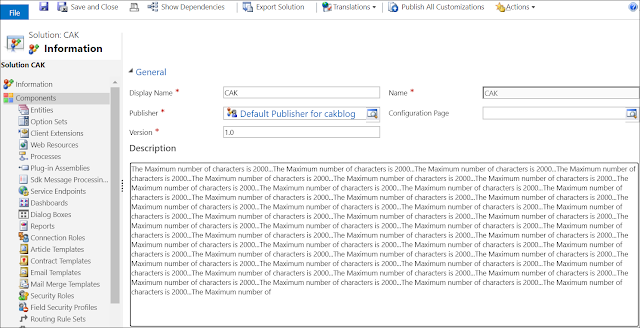
When working with D365 Solutions, you often use the Description field in order to keep track of your solution versions and the changes done through the project, by entering the appropriate details to each version and functionalities. However, and for big projects with many details entered in the Description field, you might encounter an issue which is the 2000 characters limit for the description field ; therefore, you will not be able to enter more details which lead to loss of tracking. In the Classic Interface, you won't be able to enter additional details In the PowerApps maker, you will get the error when you save that the length of the 'description' attribute of the 'solution' entity exceeded the maximum allowed length of '2000' . To overcome this limitation, you can use the OOB Configuration Page of the solution . The C...

DYNAMICS 365 HTML WEB RESOURCE WEB INTERFACE VS UNIFIED INTERFACE

In this quick post, I will talk about two differences between the Web Interface and the Unified Interface when opening a HTML Web Resource in a new window . These two differences are: Refresh the D365 opener of the html web resource Close the opened html web resource In the Web Interface, we normally use the below functions to achieve the needed action: Refresh the D365 opener: opener.location.reload(); Close the opened html web resource: window.close(); However, with the arrival of the Unified Interface, slight changes started to arise, especially for the JavaScript. Some of them are for the above actions. Using the same JavaScript functions for the Unified Interface will not work. Fortunately, we c...