Posts

Showing posts with the label Business Rules

DYNAMICS 365 BUSINESS RULES LIMITATION WITH MULTISELECT OPTION SET FIELD

Image
Since the introduction of the Business Rules as a new functionality in Dynamics 365, it becomes the recommended way to be leveraged against writing client-side code whenever it is possible. By using this approach, it will become more maintainable and supportable for further upgrades of the environment and will reduce time spent on code management and compatibility before/after the updates. However, there are situations where you cannot fully apply your needs in a Business Rules due to the complexity of the need or limitation in the Business Rules. Therefore, you have to get back again to JavaScript. In this post, I will talk about one of those limitations in Business Rules which is related to Multiselect option set fields . Unfortunately, when you have a multiselect option set field, you cannot use it as part of the Business Rule condition or within the available actions, even if you wan...

DYNAMICS 365 HOW TO DISABLE FIELDS AFTER RECORD CREATION - NO CODE SOLUTION

Image
Last day, I had a task that requires to disable some fields on the form after the record is created. As a developer, you might directly thought in JavaScript; but, there is an easier and faster way to do it with no code needed, Business Rules . In this post, we will see how to disable fields after the record creation using Business Rules Below are the needed steps to achieve this need Go to the specific entity and create a new business rule In the Condition element, choose a field that it will always be filled once the record is created (created on, modified on...) Add the condition if the chosen field Does Not Contain Data => record not yet created ( Modified On Does not contain data , Create On Does not contain data ...) In the True par...

DYNAMICS 365 HOW TO COPY PASTE BUSINESS RULES COMPONENTS

Image
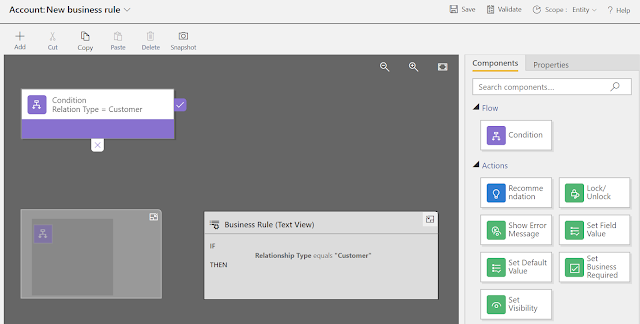
Last day, I was working with Business Rules and one of them was quite large and contains many conditions and actions. To speed up my creation of this business rule, I used the Copy/Paste components in Business Rules that exists out-of-the-box. So I decided to write a post about it and share my thoughts. For the sake of this post, I will create a new business rule against the Account entity. This business rule will show/hide fields and make them required based on the Relation Type field. Therefore, similar conditions and actions will exist in order to achieve this requirement. Let's start by setting the initial condition Next, in the right pane, Drag/Drop the components Set Visibility and Set Business Required to the True part of the condition and set t...