Posts

DYNAMICS 365 HOW TO EXECUTE WORKFLOW ON THOUSANDS/ALL RECORDS

Image
Do you have a situation where you want to run a workflow for thousands or all records of an entity in Dynamics 365 ? If yes, then this post will help you to achieve it. In CRM web client, you can run a on-demand workflows for only 250 records per entity, but, there is a workaround to overcome this limitation... using "Bulk Workflow Execution" plugin in XrmToolbox. Based on a FetchXml query, you can now use the "Bulk Workflow Execution" plugin to retrieve records from CRM/D365 entities, select a specific on-demand workflow, and run the selected workflow on those records. To accomplish this, you need to follow the below steps: Create a on-demand workflow to retrieve the records based on your needs For the sake of this demo, we will create a simple workflow on Account entity and add an Update step ...
DYNAMICS 365 V9 ADVANCED FIND ASSOCIATION WITH OPERATOR DOES NOT CONTAIN DATA

Image
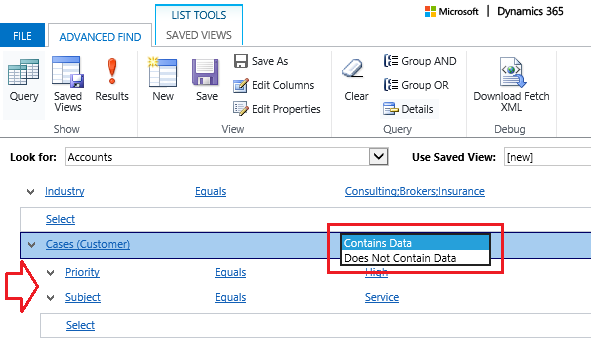
One of the interesting feature that Microsoft added in D365 V9 is Contains Data & Does Not Contain Data options in the Advanced Find related records. The purpose of this feature is to have the ability to search for records that are not related to child records. For example: Accounts with no Cases, Contacts with no Tasks... and any other similar needs. In previous CRM versions, we were not able to do this directly in the Advanced Find; but now, it is feasible and so easy through Advanced Find . Example 1 (Contains Data) : Show all Accounts that have Cases linked to them In D365 V9 environment, open the Advanced Find Select Accounts in the Look for option Under the Fields...

DYNAMICS 365 HOW TO DEBUG A PLUGIN USING PLUGIN PROFILER

Image
Often, you might face issue that it is not clear and you are not able to solve it due an error being raised in your plugins triggered. Therefore, you are obliged to debug the plugin in order to troubleshoot and solve the problem. In this post, you will learn how to debug your plugin of Dynamics 365 environment using Plugin Profiler in the Plugin Registration Tool. Below are the needed Step by Step procedure to debug a plugin Installing Plugin Profiler Open the Plugin Registration Tool From the menu, click Install Profiler to install it Once the installation is done, you will get a notification ...

DYNAMICS 365 HOW TO USE UNDER AND NOT UNDER OPERATORS

Image
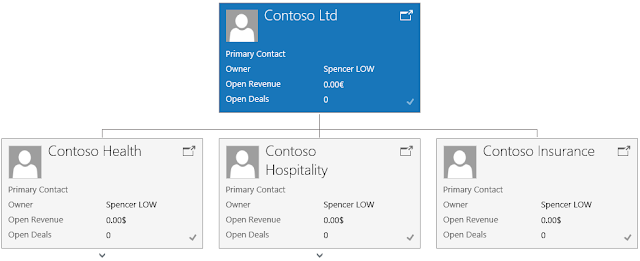
Since the introduction of the hierarchical structure feature in CRM, querying the hierarchical data has become an interesting way of retrieving info. For this purpose, new conditional operators called "Under" and "Not Under" are added in Advanced Find . To check this functionality, the below hierarchy sample will be used between the accounts records wherever it is located in the hierarchy These conditional operators can be used in one of the below locations: Advanced Find In the Advanced Find window, Look for Accounts In Select > Fields , choose Account In the list of operators, Under and Not Under operators exist in the list ...

DYNAMICS 365 WORKFLOW DEACTIVATED AFTER CRM SOLUTION IMPORT

Image
PROBLEM After importing a CRM solution to a new environment and this solution contains a workflow with a Send Email step, the import is completed but with warning that the process cannot be automatically activated. REASON In a workflow, you added a Send Email step When you click on Set Properties button, scroll down to the Additional Fields tab and you will notice that the Currency lookup field is filled with the Base Currency (noting that this field is useless here) You add the workflow to a solution, export it, and import it in a new environment Now, if the currency specified in the workflow Send Email step does not exist in the new environment, the import will be completed, but, with a warning ...