Posts

CREATE OR UPDATE (UPSERT) RECORDS USING ALTERNATE KEYS IN DYNAMICS 365 SDK

In another post, we saw how to retrieve a record based on alternate key in Dynamics 365 using the SDK In this post, we will see how to create or update (upsert) a record based on alternate key in Dynamics 365 using the SDK . The below sample code can be used to achieve the UpdateRequest. For the sake of this post, the alternate key is set up on the Account Name (name) field of the account entity. public void UpsertRecordByKey() { KeyAttributeCollection keys = new KeyAttributeCollection { { Account.Fields.Name, "cak account" } }; Account objAccount = new Account(); objAccount.Name = "cak account"; Upse...

RETRIEVE RECORDS USING ALTERNATE KEYS IN DYNAMICS 365 SDK

Image
With Dynamics 365 SDK, you can retrieve a single record by its GUID using the Retrieve method, but, what if you don't have the GUID of the record ? Another approach is to retrieve the record by its alternative keys. However, you cannot use the Retrieve method to do this because it does not have any option to pass the alternate key value. This approach will need the RetrieveRequest to be done. In another post, we saw how to create or update (upsert) a record based on alternate key in Dynamics 365 using the SDK Below, is a sample code on how to retrieve a record based on alternate key in Dynamics 365 using the SDK . For the sake of this post, the alternate key is set up on the Account Name (name) field of the account entity. public void RetrieveRecordB...

CONVERT QUERYEXPRESSION TO FETCHXML AND VICE-VERSA IN DYNAMICS 365

Image
In this quick post, we will see how to convert Query Expression to FetchXML and how to convert FetchXML to Query Expression in Dynamics 365 . QUERY EXPRESSION TO FECTH XML The below function can be used to convert a Query Expression into Fetch Xml query public void ConvertQueryExpressionToFetchXml() { List<Account> lstAccounts = new List<Account>(); QueryExpression qeQuery = new QueryExpression(Account.EntityLogicalName) { ColumnSet = new ColumnSet(Account.Fields.Id), Criteria = new FilterExpression() { FilterOperator = LogicalOperator.And, Conditions = { new ConditionExpression(Account.Fields.StateCod...

DYNAMICS 365 POWER PANE BROWSER EXTENSION

Image
In another series of posts ( Part 1 , Part 2 , Part 3 ), we saw a list of advanced actions that can be performed by the users using the browser extension Level up for Dynamics 365/Power Apps . In this post, we will see another browser extension which is the Dynamics 365 Power Pane and what actions can be done with it. GENERAL USER INFO This option will show some info about the current user such as User Name, what roles the user has, etc... ...

DYNAMICS 365 LEVEL UP BROWSER EXTENSION - PART 3

Image
In another posts, we saw what actions can be done in the Forms and Navigation sections of DYNAMICS 365 LEVEL UP BROWSER EXTENSION In this post, we will see the other actions that can be done in the Dynamics 365 Level up Browser Extension . VIEW NEW WINDOW This option will display the current system/personal view in a new window QUICK FIND FIELDS This option will display the search fields of the quick find view for the current entity ...

DYNAMICS 365 LEVEL UP BROWSER EXTENSION - PART 2 - NAVIGATION

Image
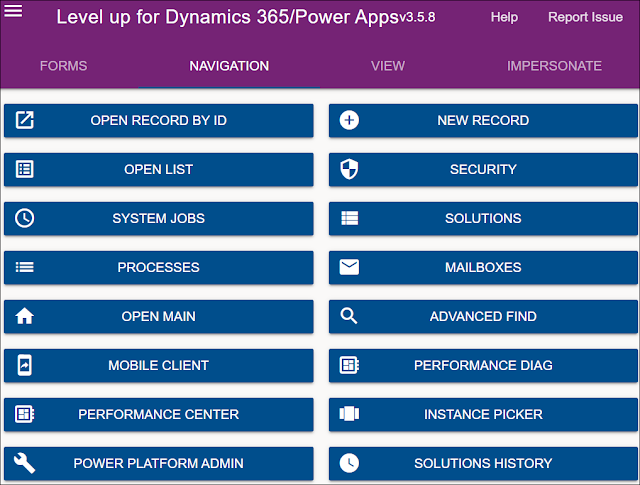
In another post, we saw what actions can be done in the Forms section of DYNAMICS 365 LEVEL UP BROWSER EXTENSION In this post, we will see what actions can be done in the Navigation section of the Dynamics 365 Level up Browser Extension . OPEN RECORD BY ID This option will open a record in a new tab based on the entity logical name and record GUID you enter NEW RECORD This option will open a new record form in a new tab based on the entity logical name you enter OPEN LIST This option will open the list view page of ...

DYNAMICS 365 LEVEL UP BROWSER EXTENSION - PART 1 - FORMS

Image
Level up for Dynamics 365/Power Apps is a browser extension in Edge, Google Chrome, and Firefox that can help users to perform advanced actions related to Dynamics 365. It is a free and very useful tool that can be downloaded from the browser extension web store. It contains a bunch of features that we will be listing and explaining them in a series of posts around the Level up extension In this post, we will see a brief summary about the Forms actions that can be done in the Level up for Dynamics 365/Power Apps . LOGICAL NAMES This option will show logical names for fields, tabs, web resources and sub-grids on the form CLEAR LOGICAL NAMES This option will remove the logical names of fields, tab...